The full story in 34 slides. Present it on the full screen, or scroll.
Design challenge · October 2026
Hue
You sell. Hue keeps track.
A light customer relationship management tool for Avient Specialty Inks sales reps
Loo Say Hien · User Experience Designer
A concept with sample data. Not an official Avient product.
1 of 34
Notes. Hello, I am Say Hien. This is Hue. It is a light customer relationship management tool for the sales reps of Avient Specialty Inks. I designed it around one sales rep, Daniel. I designed it for this challenge. First, you see a short film of the result. Then I show the user, the ideas and the design. At the end, you can try it on your phone. It uses sample data. It is not an official Avient product.
The start
The brief has four goals. I designed for one sales rep.
The setting. Dozens of deals at one time. Long sales cycles. Different customers, deal sizes and urgency.
See sales progress
How far is he from his target?
Put high value deals first
Which deal is first today?
Act fast, with no tedious notes
How can he keep the record with little typing?
Spot stalled deals
Which customers do not reply?
My scope: one sales rep, one work day
A tool for all users helps no user. So I designed for Daniel.
What I made
A prototype for three devices
A design system
A guide: How Hue Works
A short film
Hue · Design challenge · Loo Say Hien
2
2 of 34
Notes. The brief asks for a tool that helps a sales rep do four things. One: see how the sales are going. Two: put the deals of high value first. Three: spot deals that are stuck. Four: act fast, without tedious notes and documents. The setting matters too. A sales rep has dozens of deals at one time. The sales cycles are long. The customers, the deal sizes and the urgency are all different. Urgency has two answers in my design. Today puts the visits in order of time. The follow ups come in order of points, and a promise that is due today counts most. I designed for one sales rep on one work day, because a tool for all users helps no user. I made a prototype for three devices, a design system, a guide and a short film.
The start
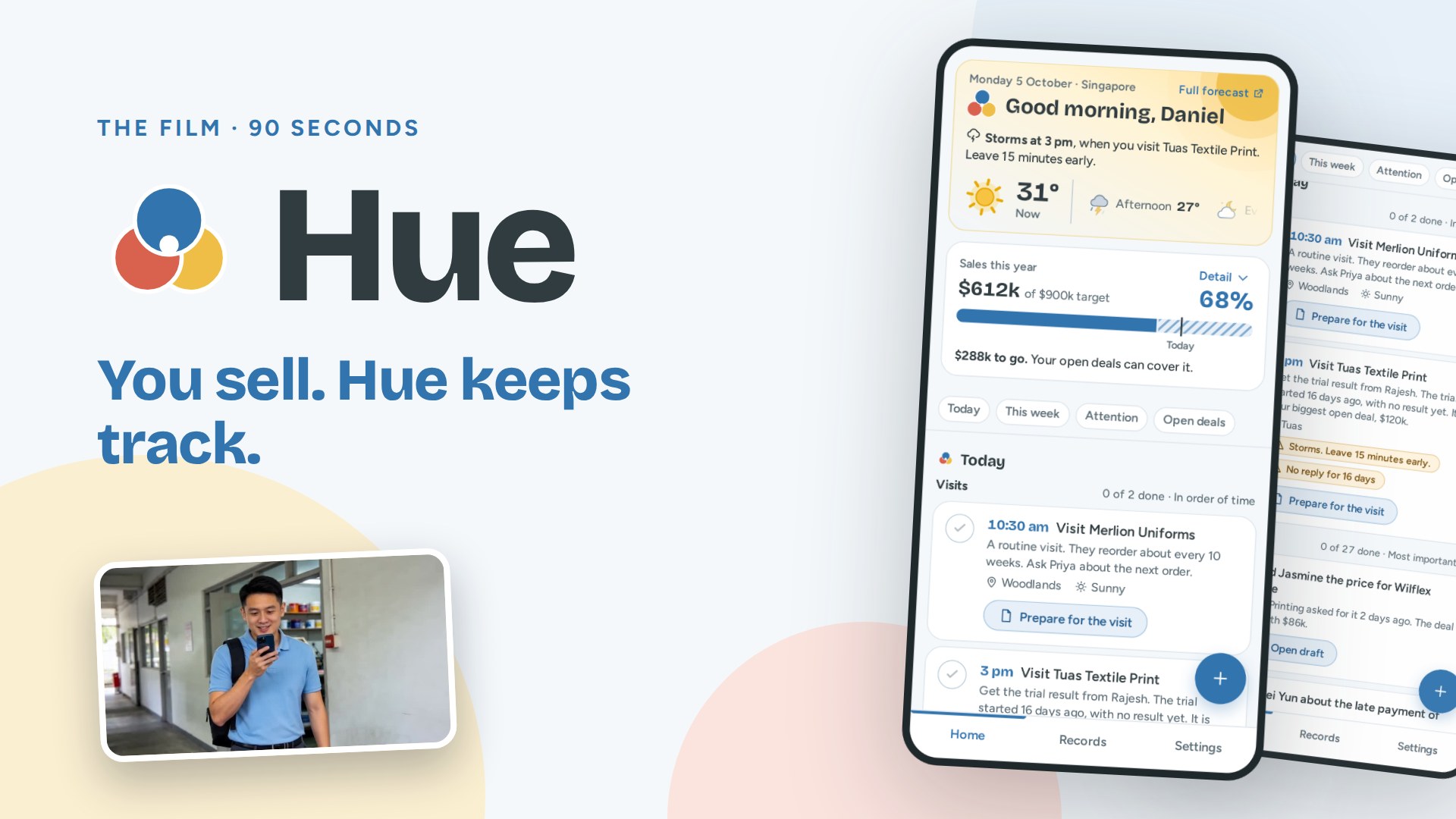
First, watch the film. It shows Hue in 90 seconds.
Click the picture to play the film. It has sound.
Each screen in the film is the real prototype. I recorded it while it worked.
The voice reads the numbers from the real screens.
Notes. First, watch the film. It shows the result in 90 seconds. Click the picture to play the film. It has sound. Do not talk while it plays. Each screen in the film is the real prototype. If the film does not play, open the link, or play the film file from the computer.
The user
The user: Daniel Lim. He sells printing inks to print shops.
About 40 customers and 30 open deals
Print shops and garment makers in Singapore.
He works from his car and his phone
He is on the road on most days.
He writes the important parts in a notepad
It looks respectful. He records his voice only when the customer agrees.
He knows inks, not software
8 years in screen printing, 2 years in sales. He does not accept long forms.
"To write a note is fast. To put it into a record is slow. And it is hard to keep track of many things: promises, prices, samples, payments and dates."
The most important finding
Daniel is not a real person. I made him from the job description, seven sales videos and a forum of sales reps. The picture is generated.
Hue · Design challenge · Loo Say Hien
4
4 of 34
Notes. This is Daniel Lim. He is not a real person. I made him from the job description, seven sales videos and a forum of sales reps. He has about 40 customers. He works from his car and his phone. In a meeting, he writes the important parts in a notepad. He records his voice only when the customer agrees, or after the visit. The most important finding is this: to write a note is fast. To put it into a record is slow. And it is hard to keep track of many things: promises, prices, samples, payments and dates.
The user · Stages 1 to 3 · Click or tap a picture to play its clip
Daniel's week has six stages. Each stage has one problem.
1. Plan the week
He feels rushed
Problem. His facts are in chats, email, a notebook and a spreadsheet. He plans mostly from memory.
Hue. Home shows the full week on one screen.
2. Meet the customer
He feels focused
Problem. He writes short notes by hand. They are fast, but often not complete, and they often stay in his notepad.
Hue. He chooses how to record: talk, type, write, or take a photo.
3. After the meeting
He feels tired
Problem. He replies in WhatsApp, in calls and in email. Later, he possibly does not remember where he kept a note about a promise.
Hue. He records one note. Hue finds the customer, the next step and the date.
Hue · Design challenge · Loo Say Hien
5
5 of 34
Notes. I studied one week of his work. It has six stages. On Monday, he plans mostly from memory, because his facts are in four places: chats, email, a notebook and a spreadsheet. In the meeting, he writes short notes by hand, and they often stay in his notepad. After the meeting, he replies in three apps: WhatsApp, calls and email. Later, he possibly does not remember where he kept a note about a promise. For each stage, the blue line shows what Hue does.
The user · Stages 4 to 6 · Click or tap a picture to play its clip
Daniel's week has six stages. Each stage has one problem.
4. Follow up and quote
He feels worried
Problem. He makes many small promises. He can forget some of them.
Hue. Each promise has a date. Today shows the promise on that date.
5. The customer does not reply
He feels not sure
Problem. Is the customer busy? Is the trial slow? Is the deal lost? He is often not sure.
Hue. Hue compares the wait with the usual wait. It gives the reason and writes a message.
6. Win the order
He feels proud
Problem. He knows why he won or lost. But the reason stays in his head. A late payment can be a surprise.
Hue. His notes keep what the customer said. The record shows the payments.
Hue · Design challenge · Loo Say Hien
6
6 of 34
Notes. In stage 4, he makes many small promises, and he can forget some of them. In stage 5, the customer does not reply. He is often not sure if the customer is busy or if the deal is lost. In stage 6, he wins the order. He knows why, because the customer tells him. But the reason stays in his head, and a late payment can be a surprise.
The user
Research: five things I learned about the work of a sales rep.
He learns the most in the meeting
He writes short notes there. The slow part comes later: to put them into a record.
A fast reply wins the deal
But he must know which customer waits for a reply.
Old customers are easy to win back
But no list shows who he is not in touch with.
Customers buy from people they trust
So the record keeps what he knows about each person: who decides, and what they want.
A recording can feel intrusive
Also when the customer agrees. So Hue records only the voice of Daniel, and he can write by hand.
Hue · Design challenge · Loo Say Hien
7
7 of 34
Notes. I learned five things. I will tell you two. Number one: he learns the most in the meeting. He writes short notes there. The slow part comes later, when he must put them into a record. This is the reason for the round button: a note goes into the record in seconds. Number five: a recording can feel intrusive, also when the customer agrees. This is the reason that Hue records only the voice of Daniel, and that he can write by hand.
The user · The problem
The problem: Daniel must record what customers say, quickly and correctly. Then he must do many tasks, small and large, each at the right time.
Customer questions
Promises
Deals and stages
Payments
What each customer likes
His sales target
He is like a busy waiter. He takes many orders and carries many plates. Each plate must arrive on time.
It is harder because his information is in many places: chats, email, a notebook, a spreadsheet and his memory.
See sales progress
"How far am I from my target?"
Know what is important
"Which deal is first today?"
Find deals with no reply
"Which customers do not reply?"
Act quickly
"What do I do next?"
Hue · Design challenge · Loo Say Hien
8
8 of 34
Notes. This is the problem. Daniel must record what customers say, quickly and correctly. Then he must do many tasks, small and large, each at the right time. He tracks questions, promises, deals, payments, what each customer likes, and his sales target. He is like a busy waiter. He takes many orders and carries many plates, and each plate must arrive on time. It is harder because his information is in many places. He needs four answers. Each answer is one goal of the brief.
The user
From the problem, I wrote five questions for the design.
How might we
Let Daniel record what customers say in the way he already does, quickly and correctly?
Put each part of a note in the right place in the customer record, with as little effort from him as possible?
Remind him of each promise and follow up at the right time, with the most important first?
Help Daniel spot quiet deals and late payments, and alert him only when it matters?
Show Daniel how far he is from his target, with no report to fill in?
Hue · Design challenge · Loo Say Hien
9
9 of 34
Notes. From the problem, I wrote five questions for the design. I read two. How might we let Daniel record what customers say in the way he already does, quickly and correctly? And how might we put each part of a note in the right place in the record, with as little effort from him as possible? Each screen in the prototype answers one or more of these questions.
The ideas
I had 23 ideas. The ideas with a high privacy risk stopped first.
23
ideas with scores
Each idea has three scores from 1 to 5: impact, effort and privacy risk.
3
ideas stopped
Their privacy risk was 4 or 5. Example: record the full meeting.
18
ideas passed
Two more ideas wait for a later version.
5
groups built first
Together they answer the four goals.
Why privacy risk is first
I can exchange impact for effort. I cannot exchange the trust of a customer. When the customer agrees, the risk is lower. But a recording can still feel intrusive. So the prototype has safer ways: Hue records only the voice of Daniel, and he can write by hand.
Hue · Design challenge · Loo Say Hien
10
10 of 34
Notes. I wrote 23 ideas. Each idea got three scores: impact, effort and privacy risk. First I removed the ideas with a high privacy risk. One example: to record the full meeting had a high impact, but also a high risk. When the customer agrees, the risk is lower. But a recording can still feel intrusive. So it stopped. The prototype has safer ways: Hue records only the voice of Daniel, and he can write by hand. Then 18 ideas passed. I built five groups of ideas first.
The ideas
All 23 ideas and their scores.
#
Idea
I
E
P
Result
1
Hue AI assistant
5
5
2
Built
2
Quick tags in a meeting
4
1
1
Not built
3
Voice note
4
2
3
Built
4
Notebook photo
3
2
1
Built
5
Record the full meeting
4
3
4
Stopped
6
Share a WhatsApp chat
4
2
3
Not built
7
Hue adds emails and calls
4
3
3
Not built
8
Phone that always listens
3
4
5
Stopped
9
Smart glasses
2
5
5
Stopped
10
Today: visits and follow ups
5
2
1
Built
11
Prepare for a visit
4
2
1
Built
12
Sales against the target
4
2
1
Built
#
Idea
I
E
P
Result
13
Hue alerts when no reply
5
3
1
Built
14
Revisit old quotes
4
2
1
Not built
15
Promise list and drafts
4
3
2
Built
16
Customer record
5
3
2
Built
17
Hue starts a new record
4
3
3
Not built
18
Hue suggests, Daniel confirms
4
2
1
Built
19
Home
4
3
1
Built
20
Pen notes
4
3
2
Built
21
Hue fills in the fields
5
3
2
Built
22
Hue suggests the next step
4
3
1
Built
23
Product tips from Avient
4
5
1
Later
I impact · E effort · P privacy risk, from 1 to 5. Result: the prototype now. One large language model does ideas 1, 3, 4, 20, 21 and 22. The developers connect one model.
Hue · Design challenge · Loo Say Hien
11
11 of 34
Notes. These are all 23 ideas with their scores. The last column shows the prototype now. The blue rows are built. The red rows stopped because of privacy risk. Idea 1 is Hue. One large language model can do many of these jobs: it turns speech into text, reads handwriting, fills in the fields and writes drafts. So the developers connect one model. Then they test each job with real notes. Idea 1 has effort 5, because it is the biggest part of Hue. Idea 14 is a list of old quotes to follow up again. I did not build it, because the No reply alert already catches a quote that goes quiet. I would build a separate list only if reps say that old quotes often become orders later. This is a test on the page about assumptions.
The ideas · The first version
Five main parts answer the four goals.
Record a note: talk, type, write or take a photo. Then Hue fills in the fields
Act quickly
Today: the visits and the follow ups, each with a reason
Know what is important
Home: the sales bar and the target
See sales progress
Alerts when a customer does not reply, with the reason and a message
Find deals with no reply
The customer record. Hue writes it, and Daniel can change it
All four goals use it
This was the first version. Fourteen reviews added more: the weather for his visits, four ways to record a note, a plan for a late payment, filters for 100 customers, settings and accessibility.
Hue · Design challenge · Loo Say Hien
12
12 of 34
Notes. The first version had five main parts. One: record a note in four ways, and Hue fills in the fields. Two: Today, with the visits and the follow ups. Three: Home, with the sales bar. Four: alerts when a customer does not reply. Five: the customer record, which all the other parts use. Together they answer the four goals of the brief. This was only the start. In fourteen reviews, I added the weather for his visits, a plan for a late payment, filters, settings and accessibility.
The ideas · The assistant
Hue is the assistant. Some of its features.
What is a large language model?
A computer program that learned from a very large amount of text. It understands normal words.
Why it helps Daniel
He talks and writes as with a person.
One model does many language jobs.
It reads messy notes and mixed languages.
It gives the reason in plain words.
Reads voice and writing
Turns a voice note, a notebook page or a photo into text.
Fills in the fields
Customer, next step, date, products, deal stage.
Writes a first draft
A message from his notes. He edits it, then sends.
Puts the follow ups in order
The most important is first. Each one gives the reason.
Checks the weather
At each visit. It says when to leave, for example 15 minutes early.
Alerts him to no reply
And to a late payment. Each alert gives its reason.
The model does the language jobs. The order, the weather and the alerts use data and plain rules, so Daniel can see why. He checks each field, then saves, because a model can make errors. In the prototype, the language features are samples.
Hue · Design challenge · Loo Say Hien
13
13 of 34
Notes. Now I show the assistant in one view. Hue is the assistant in the tool. Here are some of its features. It turns a voice note, a notebook page or a photo into text. It fills in the fields. It writes a first draft of a message. It puts the follow ups in order, with the most important first. It checks the weather at each visit, and it says when to leave, for example 15 minutes early. And it alerts Daniel to a customer with no reply and to a late payment, with the reason. Some of these features need language skills. For these, a large language model helps. A large language model is a computer program that learned from a very large amount of text. It understands normal words. So Daniel does not need forms or fixed commands. He talks and writes as with a person, and the model can read short words, messy notes and mixed languages. Other features, like the order, the weather and the alerts, use data and plain rules. So Daniel can see why. A large language model can make errors, so Daniel checks each field, then saves. In this prototype, the language features are samples. Each feature has a switch in Settings, so Daniel decides what Hue does for him.
The ideas · The business case
The case for a large language model
Without a large language model
With a large language model
In one picture
What developers build
Speech and handwriting services, word rules for each field, message templates, reason texts.
One connection to a model that reads and writes. Speech to text may stay a separate service.
Time and money
About 6 to 9 months for 3 developers, so about S$170k to S$250k. The rules keep growing.
About 2 to 3 months for 2 developers, so about S$40k to S$55k, plus about S$30 a month.
Customer data
Stays inside Avient. Speech and handwriting services would still see some.
Goes to Moonshot in Singapore. It may train on the notes, unless Avient signs an enterprise agreement.
First version: the own service of Moonshot, with sample data only until the agreement is signed. Later, Avient can host an open model itself. I assumed 10 reps, 10 notes a day, and S$8,000 plus 17% pension cost for each developer. The time on the left is my estimate.
Hue · Design challenge · Loo Say Hien
14
14 of 34
Notes. Why a large language model? Here is the business case, with numbers that I checked. I say where a number is only my estimate. Without a model, developers must build many parts: speech to text, handwriting reading, word rules for each field, message templates and texts for the reasons. I found no public figure for this build, so the time is my estimate: 6 to 9 months for 3 developers. The rules also keep growing after the launch, with each new word, language and habit of the reps. With a model, one connection does the language work. Guides from two software companies give 6 to 10 weeks for one feature, or 4 to 8 weeks for a simple connection, plus 2 to 3 weeks to plan. For several features, I use 2 to 3 months for 2 developers, with tests on real notes. For money, a mid level backend developer in Singapore earns about 7 to 9 thousand Singapore dollars a month. A salary guide of March 2026 says so. I use 8 thousand. The employer adds 17 percent for the pension fund. So one developer month costs about 9.4 thousand dollars. Three developers for 6 to 9 months cost about 170 to 250 thousand. Two developers for 2 to 3 months cost about 40 to 55 thousand. The usage fee is small. For 10 reps with 10 notes a day, the list price of the Kimi K2.6 model gives about 30 Singapore dollars a month. A price list of August 2026 shows 0.75 US dollars for a million input tokens and 3.50 for output. Other sources show lower prices. The data row matters most. For the first version, Hue uses the own service of Moonshot, the company behind Kimi. Its terms say that Moonshot may use content to improve its models. To stop this, Avient must sign an enterprise agreement. Moonshot keeps data on servers in Singapore, but it does not say how long. So in the first version, Avient should use sample data only, until the agreement is signed. Later, if Hue grows to other teams, Avient can run an open model on its own servers. Then the data stays inside Avient. But the model is very large, so the hardware costs much more. That needs a new business case. Speech to text may stay a separate service, and I did not price it. The technology team of Avient must check all these numbers. Sources: the salary guide of SkillUp, the pension rules of Singapore, the price list of CostBench, the terms and the privacy policy of Moonshot, and the guides of RaftLabs and SFAI Labs.
The ideas · The brand
Hue is a brand. Each part of the brand has a function.
Hue
Blue
Red
Yellow
Three inks that mix. Avient sells colour.
The logo moves only when Hue works. It stops when the work is done.
The logo marks each item that Hue made:
A name tells Daniel who did the work
He can say "Hue wrote this". So he knows which text he must check.
The name is not human, and Hue has no face
People expect too much from a tool that looks human. Then one error breaks their trust.
Only the logo has three colours
All other parts of the screen are blue and grey. So his eye finds each item that Hue made.
Motion shows that Hue works
He sees that Hue is busy, so he waits. No motion means that the work is done.
Hue speaks in one voice
Short sentences. A reason for each suggestion. "Check each field, then save."
Hue · Design challenge · Loo Say Hien
15
15 of 34
Notes. The assistant is a brand. It has a name, a logo, colours and motion. Each part has a function. The name lets Daniel say: Hue wrote this. So he knows which text he must check. It is not a human name and it has no face, because people expect too much from a tool that looks human. The logo is the only part of the screen with three colours, so his eye finds each item that Hue made. The logo moves only when Hue works.
The design
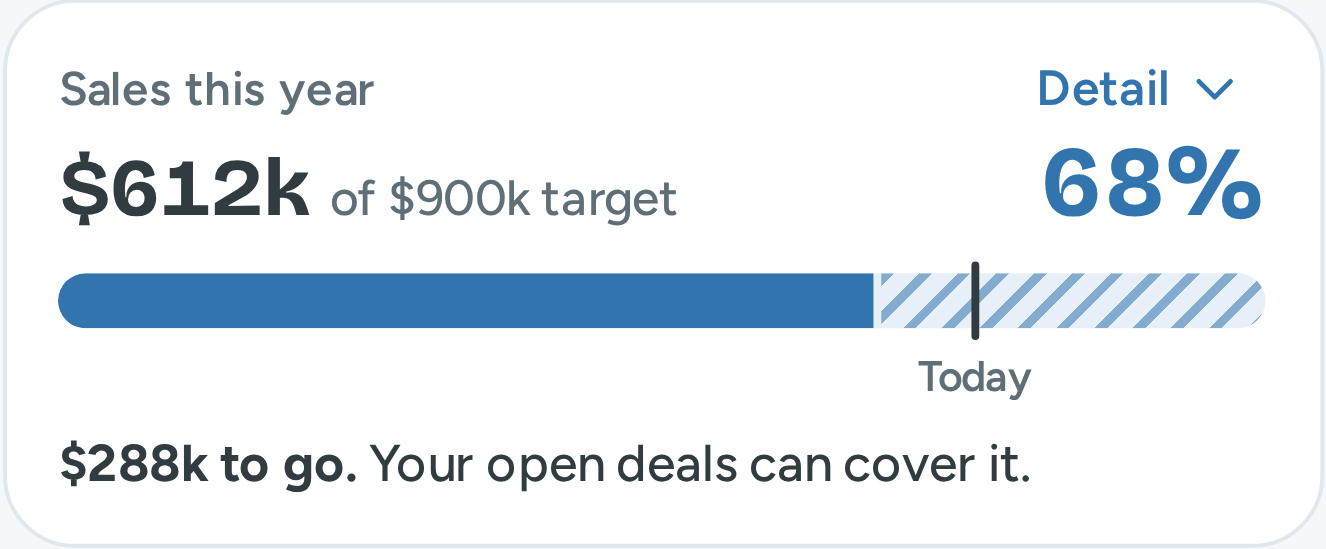
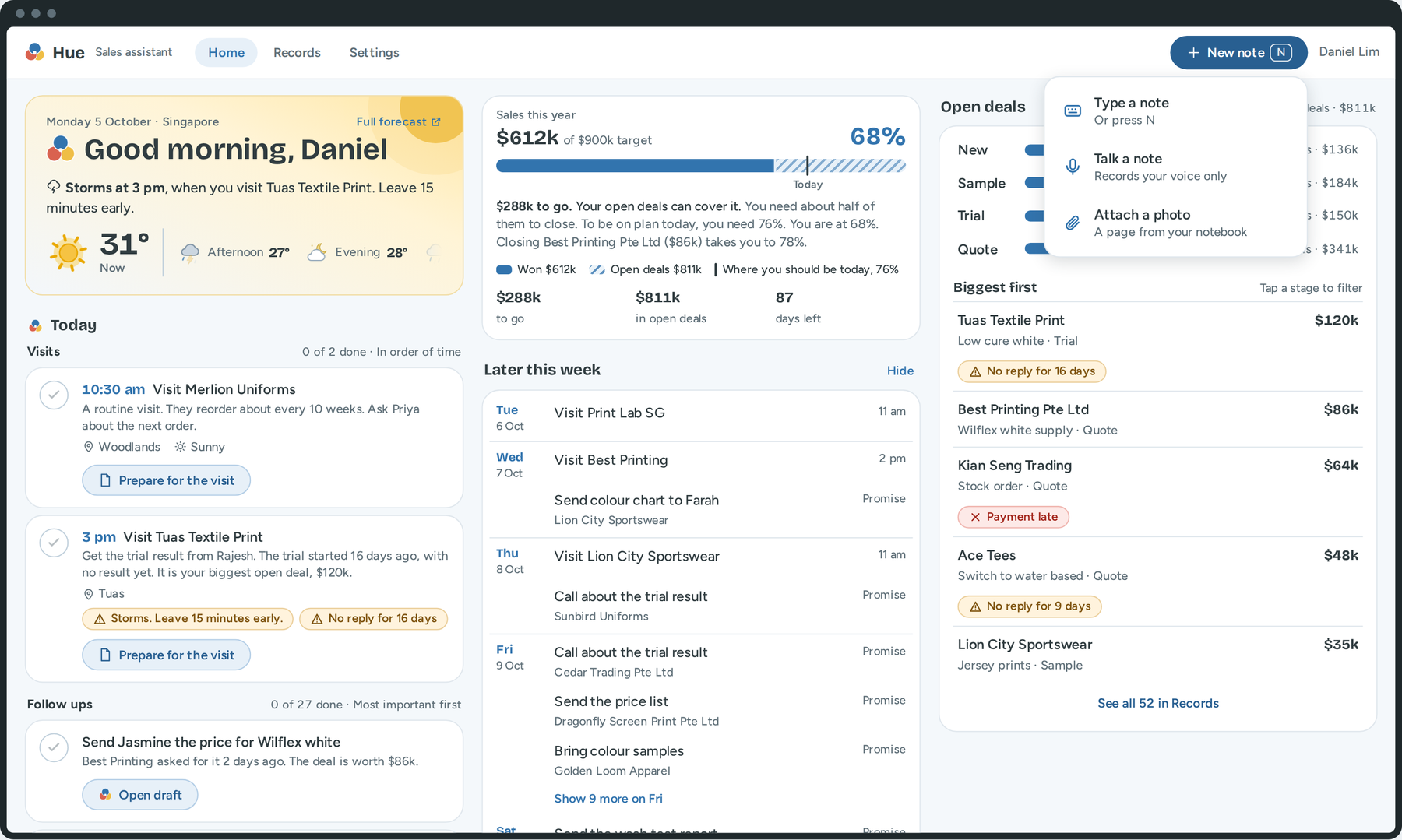
Home shows Daniel if he is on track to reach his sales target.
Blue: the sales that he won, $612k.
Stripes: his open deals. They can add to the sales.
Line: where he must be today, 76%.
One sentence gives the result: "$288k to go. Your open deals can cover it." The sentence does not say that the target is safe when it is not.
Below the bar: the notes to check, the work of today and of this week, the customers that need attention, and the open deals.
Hue · Design challenge · Loo Say Hien
16
16 of 34
Notes. Home answers one question: is he on track to reach his sales target? The blue part of the bar is the sales that he won. The striped part is his open deals. The line shows where he must be today. One sentence gives the result: 288 thousand dollars to go, and his open deals can cover it.
The design
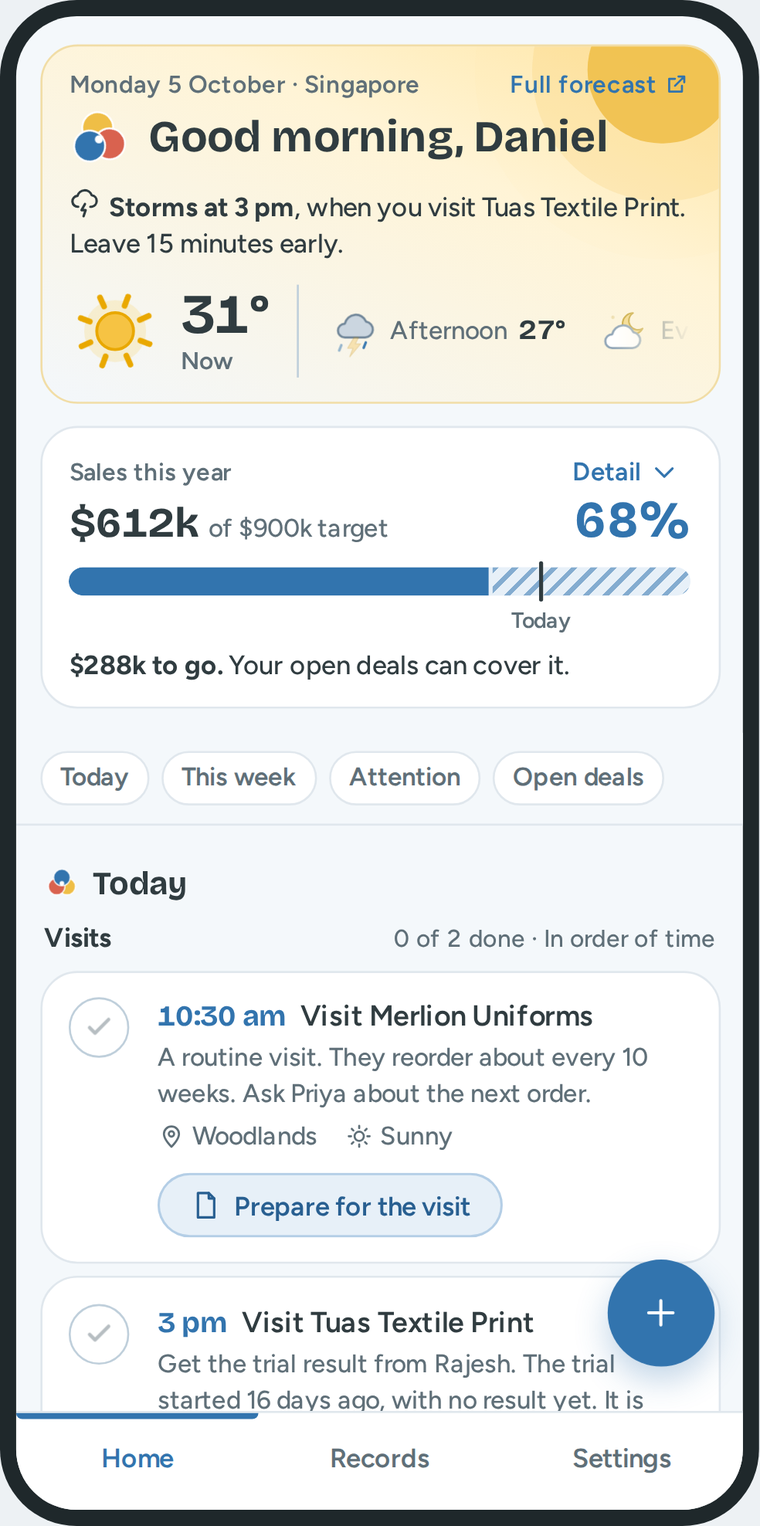
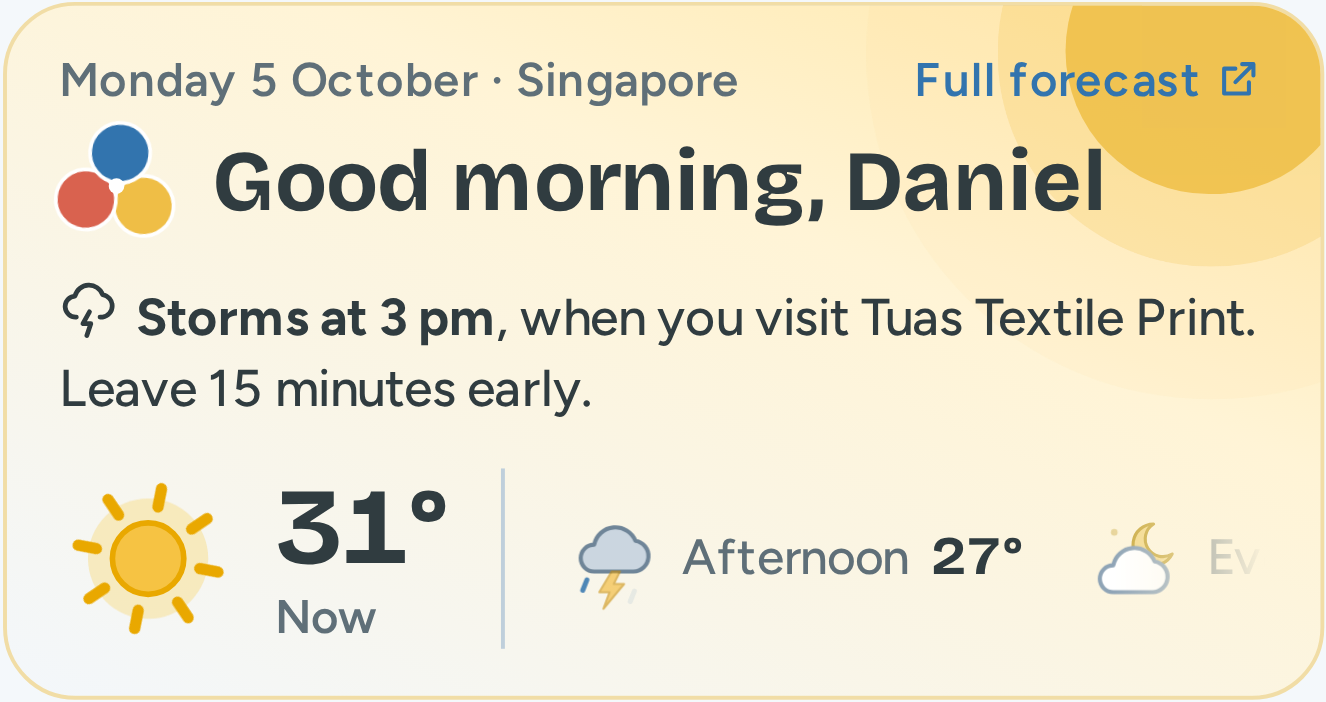
The weather tells Daniel how it changes his visits.
Home: one sentence about the weather
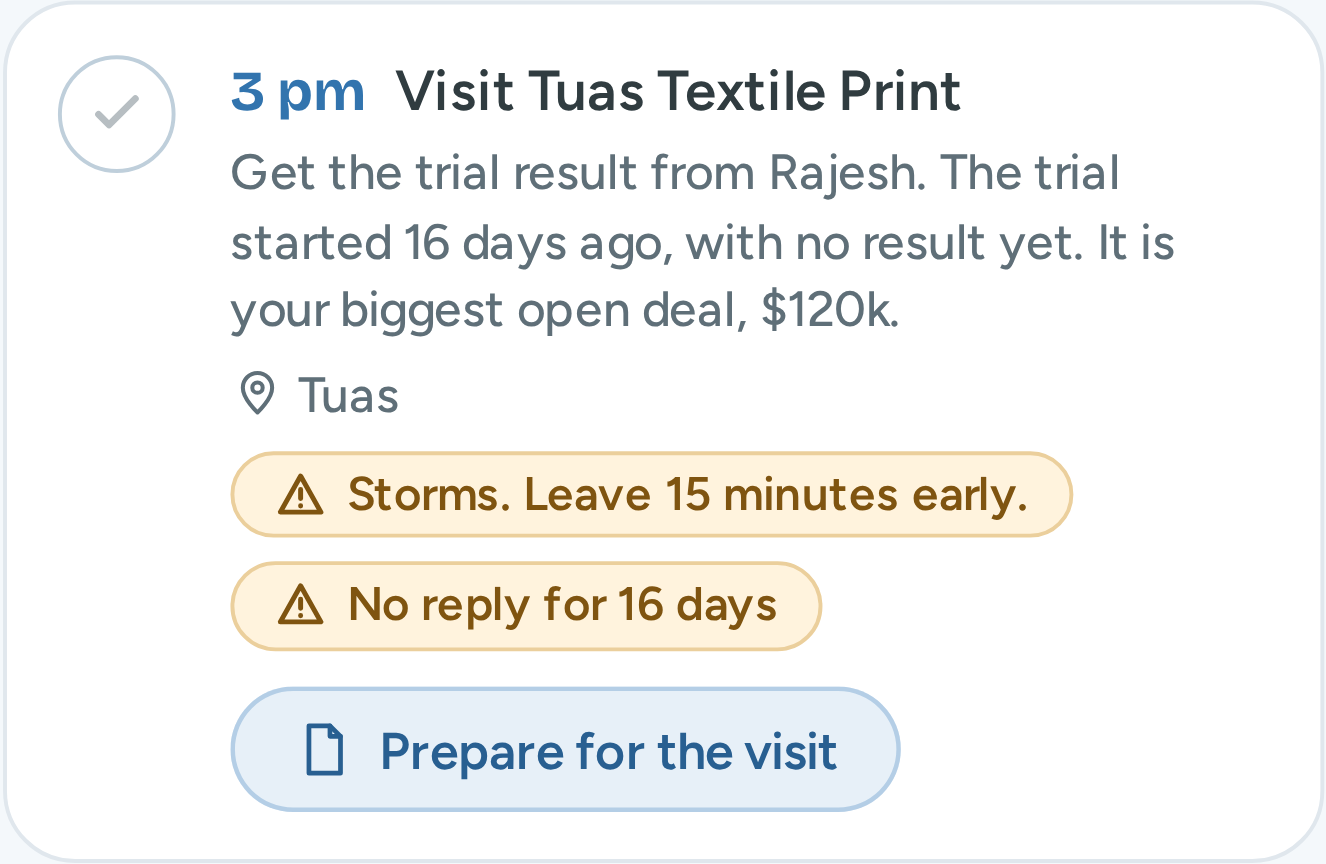
Today: the same alert on the visit
It names the visit
The visit that the weather changes.
It gives one instruction
"Leave 15 minutes early."
The colour shows the weather now
Yellow for sun. Grey for rain. Dark blue for the night.
Hue · Design challenge · Loo Say Hien
17
17 of 34
Notes. The weather is on Home for one reason: Daniel drives to his customers, and rain changes his plan. So the panel does not show only the forecast. It names the visit that the weather changes, and it gives one instruction: leave 15 minutes early. The same alert shows on that visit in Today. The colour of the panel shows the weather now: yellow for sun, grey for rain, dark blue for the night.
The design
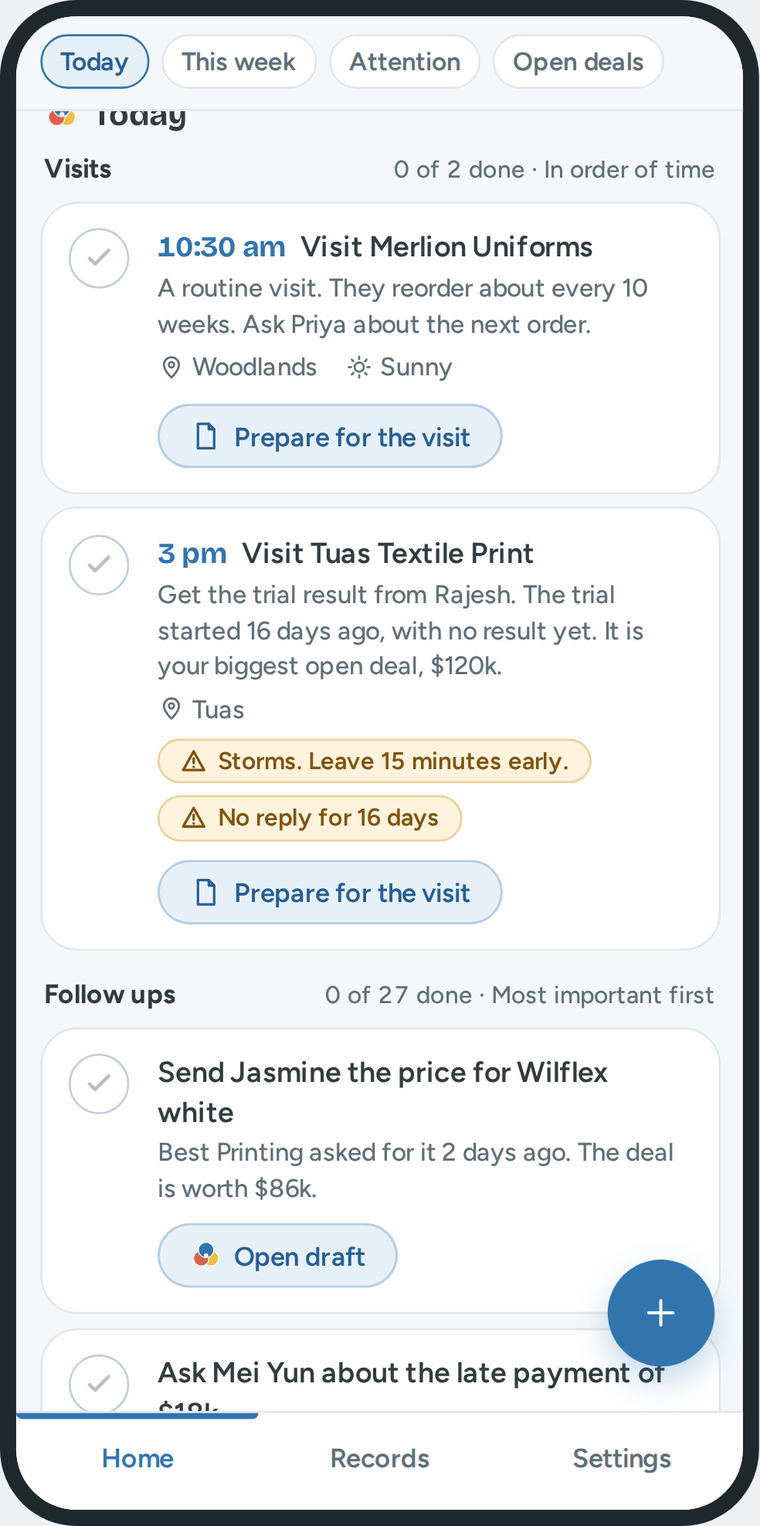
Today: first the visits, then the follow ups.
The visits are first, in order of time
A visit has a fixed time.
Then the follow ups. The most important is first
A call, a message, a quote or a question about a payment. Three show. One button shows the others.
Each item gives the reason
"Best Printing asked for it 2 days ago. The deal is worth $86k."
The button changes with the time
Before 3 pm: "Prepare for the visit". From 3 pm, the start of the visit: "Add a note about the visit".
A note completes the item
When he saves a note for that customer, Hue ticks the visit or the follow up.
Hue · Design challenge · Loo Say Hien
18
18 of 34
Notes. Today shows the work of the day. The visits are first, in order of time, because a visit has a fixed time. Then come the follow ups. A follow up is a call, a message, a quote or a question about a payment. The most important is first. Each item gives the reason. The button changes with the time. One visit is at 3 pm. Before 3 pm, the button says prepare for the visit. From 3 pm, it says add a note about the visit.
The design
This rule puts the most important follow up first.
Deal value
In thousands of dollars
×
Chance of an order
New 20%, Sample 40%, Trial 60%, Quote 80%
+
Waiting
A promise due today, and each day that someone waits
=
Points
1. Send Jasmine the price.
139 points
Deal: $86k × 80% = 69. He promised it for today: + 50. She has waited 2 days: + 20.
2. Ask Mei Yun about the late payment.
88 points
A late payment: 40. The amount, $18k: + 18. It is 30 days late: + 30.
3. Ask Mei Ling about the quote.
58 points
Deal: $48k × 80% = 38. No reply for 4 days more than usual: + 20.
Deal value × chance, or the late payment
Waiting
Waiting has three parts. A promise due today: 50 points, because a broken promise costs trust. The customer waits for Daniel: 10 points each day. Daniel waits for the customer: 5 points each day after the usual wait. His own delay counts double.
Daniel does not see the points. He sees the reason in words. These numbers are my first values. Real sales reps must test them.
Hue · Design challenge · Loo Say Hien
19
19 of 34
Notes. How does Hue know which follow up is first? It uses a rule. Points are the deal value times the chance of an order, plus the waiting time. Waiting has three parts. A promise that is due today gets 50 points, because a broken promise costs trust. This is as much as a large deal. When the customer waits for Daniel, each day gets 10 points. When Daniel waits for the customer, each day after the usual wait gets 5 points. His own delay counts double, because he can end it today. Each of these two stops at 30 points, so a small old item does not stay at the top. Here is an example. The price for Jasmine has 139 points, so it is first. A late payment has its own rule, because money that a customer owes comes before most new deals. Daniel does not see the points. He sees the reason. These numbers are my first values. A test with real sales reps must confirm them.
The design
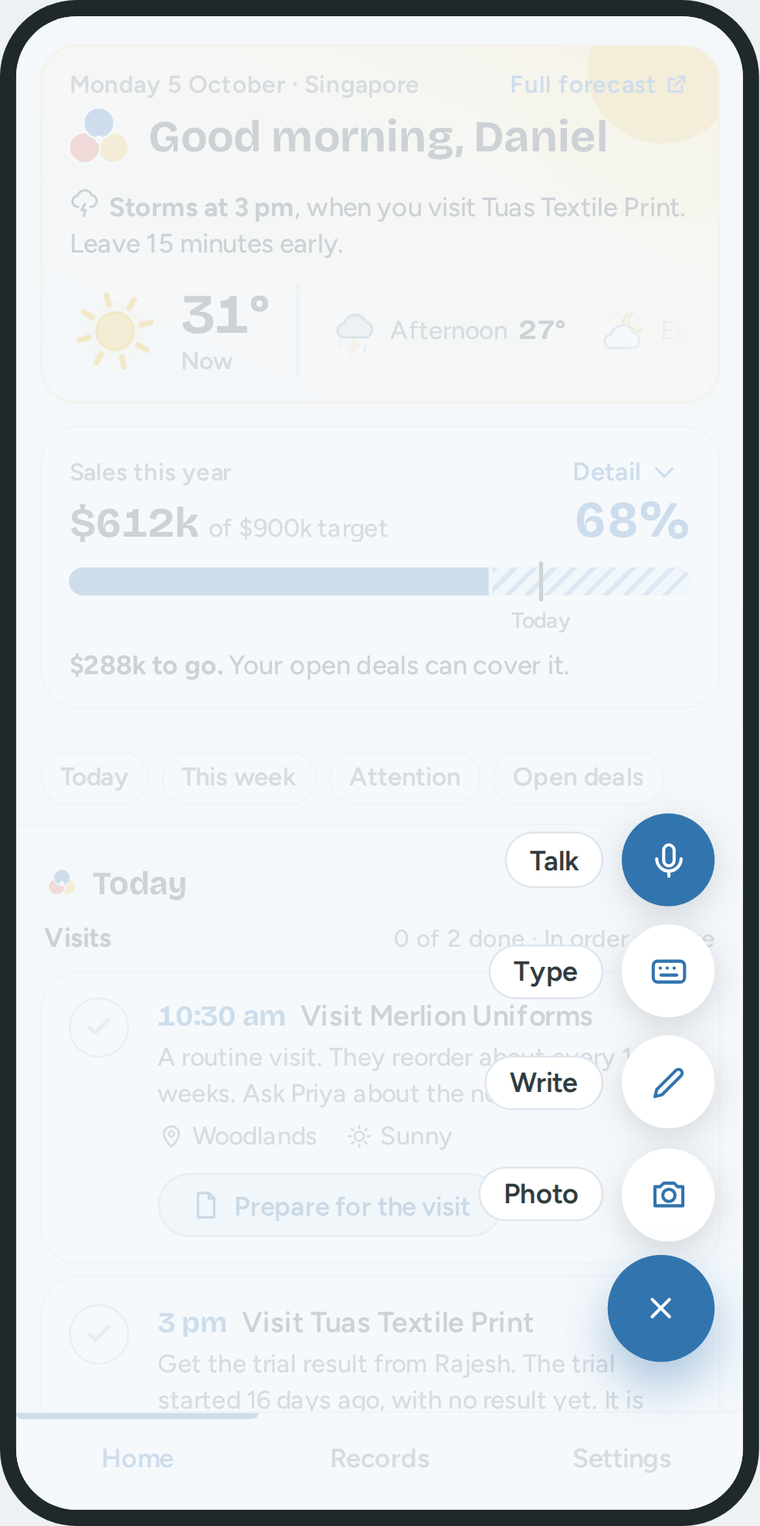
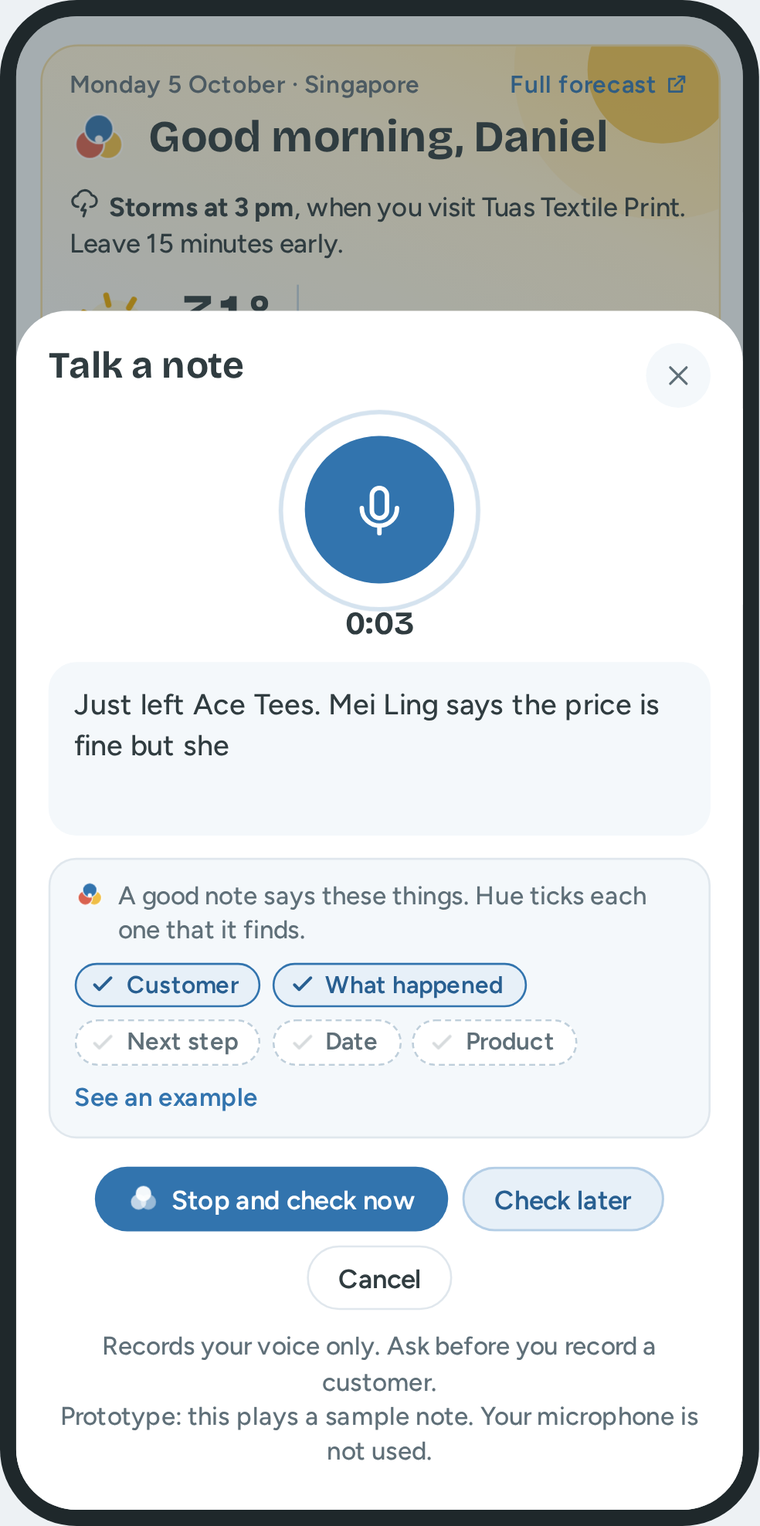
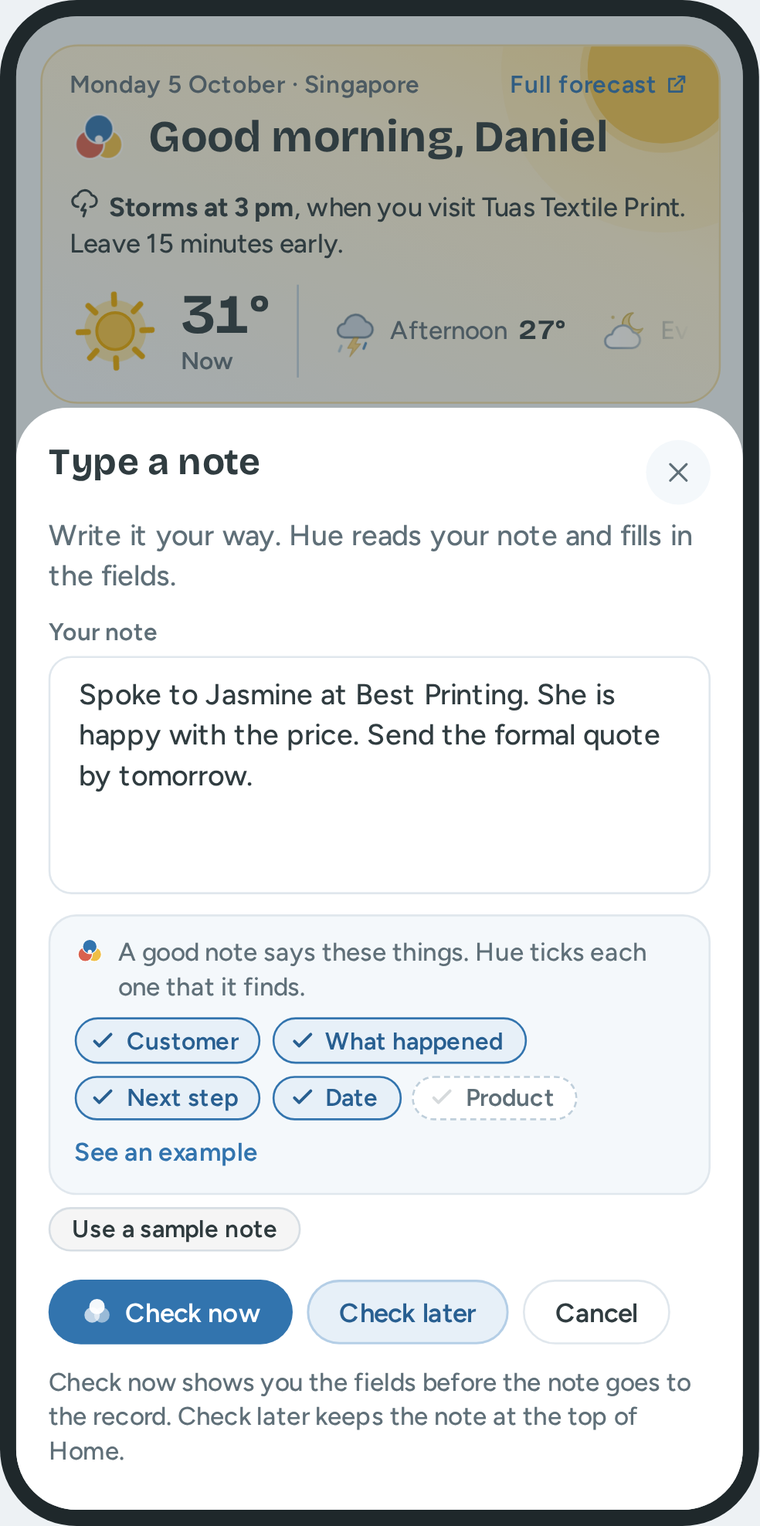
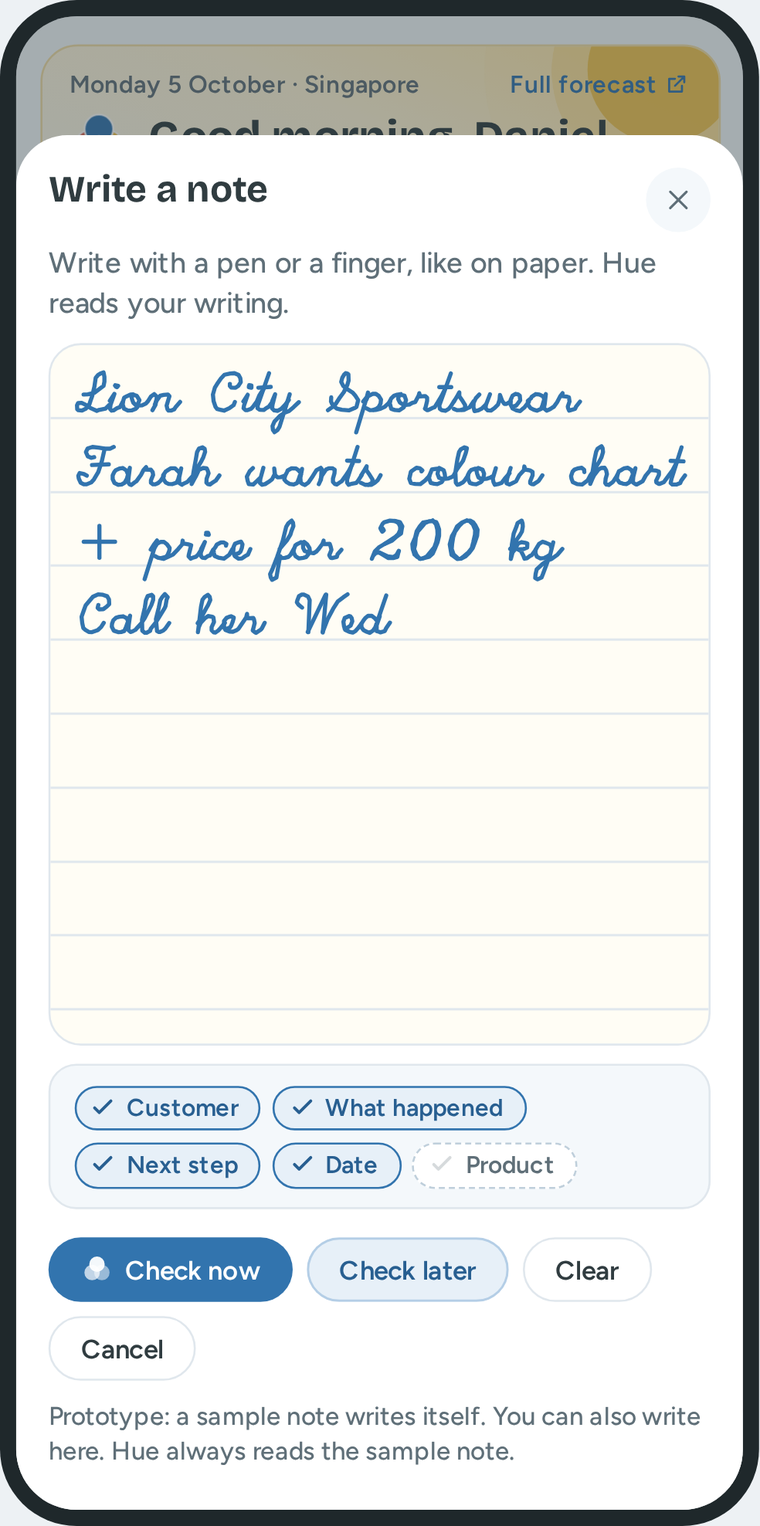
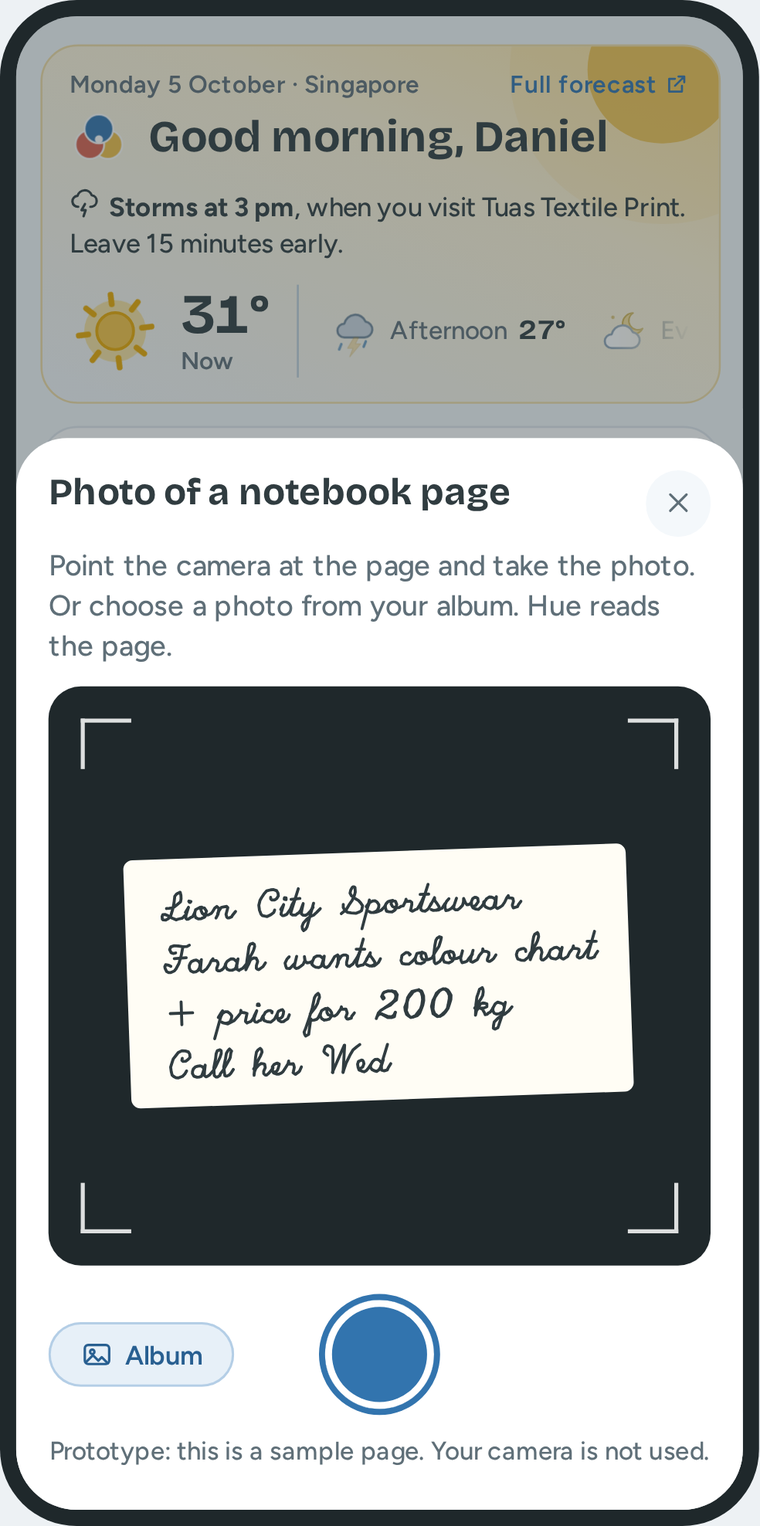
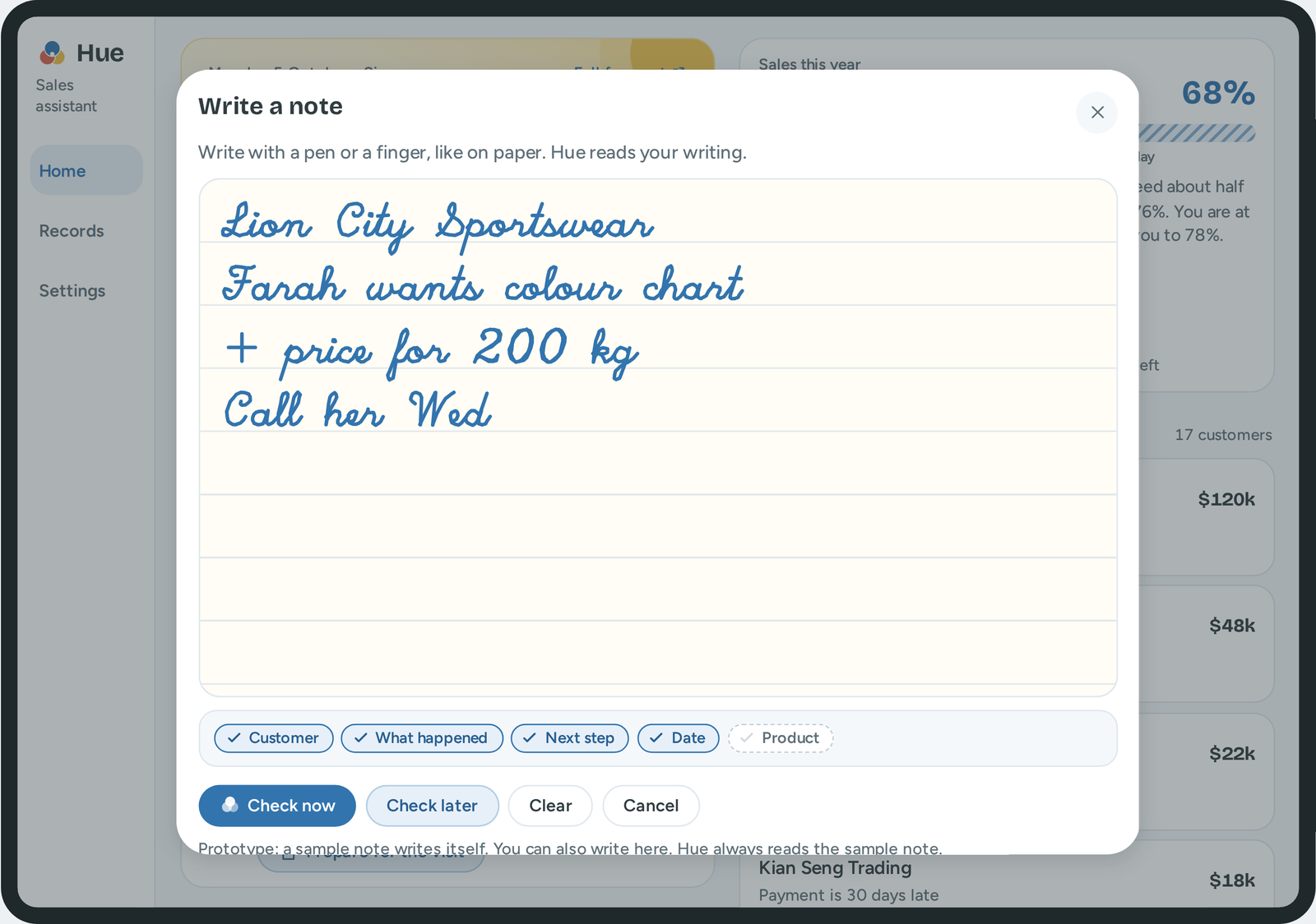
Daniel records a note in four ways.
One round button
Tap for the menu. Hold to talk immediately.
Talk
In the car, after the visit. Hue records only his voice.
Type
When the place is quiet.
Write
With a pen or a finger. A pen looks respectful in a meeting.
Photo
A photo of a page in his notebook.
Hue · Design challenge · Loo Say Hien
20
20 of 34
Notes. Daniel records a note with one round button. He taps it for the menu, or he holds it to talk immediately. He has four ways to record, because the best way changes with the situation. He talks in the car. He types when the place is quiet. He writes with a pen or a finger, and a pen looks respectful in a meeting. Or he takes a photo of a page in his notebook. On the computer, he can type, talk, or attach a photo. While he talks or types, Hue ticks what the note already says: the customer, what happened, the next step, the date and the product.
The design
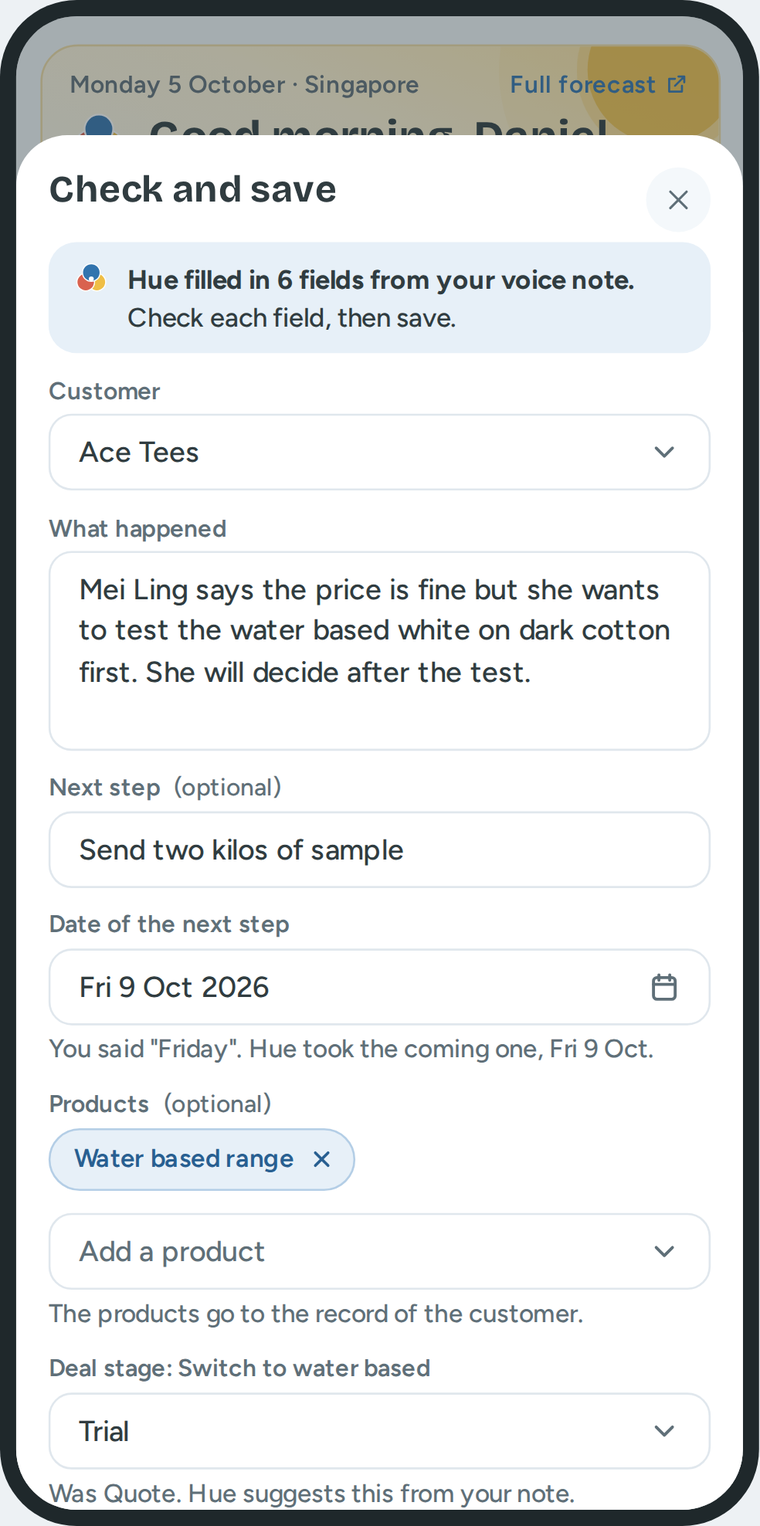
Hue fills in the fields. Daniel checks them and saves.
One line at the top says what Hue did
"Hue filled in 6 fields from your voice note. Check each field, then save."
Hue gives the reason for a choice
"You said Friday. Hue took the coming one, Fri 9 Oct."
He can check now, or check later
"Check later" keeps the note at the top of Home.
Hue saves nothing before he taps Save
Not the note, not the next step, not the deal stage.
One note updates five parts. He does one thing. Hue does five.
The timeline
The promise list
The deal stage
The follow up in Today
The sales bar
Hue · Design challenge · Loo Say Hien
21
21 of 34
Notes. Hue fills in the fields, but Daniel decides. One line at the top says what Hue did: Hue filled in six fields, check each field, then save. Below a field, Hue gives the reason for a choice. He can also check later. Then the note waits at the top of Home, and it is not in the record yet. Hue saves nothing before he taps Save. And one note updates five parts. He does one thing. Hue does five.
The design
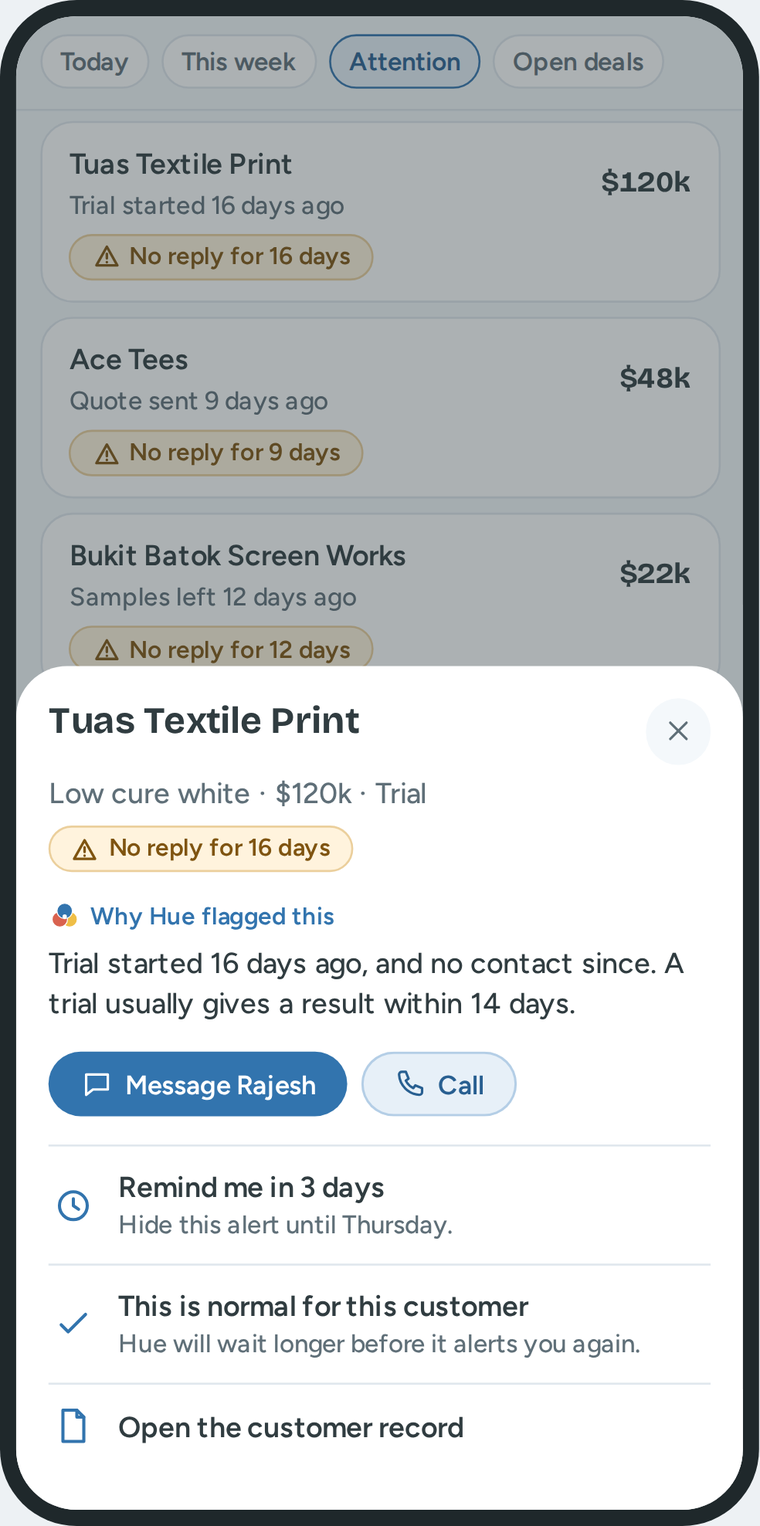
Hue alerts Daniel when a customer does not reply. It gives the reason.
"This is normal for this customer." Then Hue waits longer the next time.
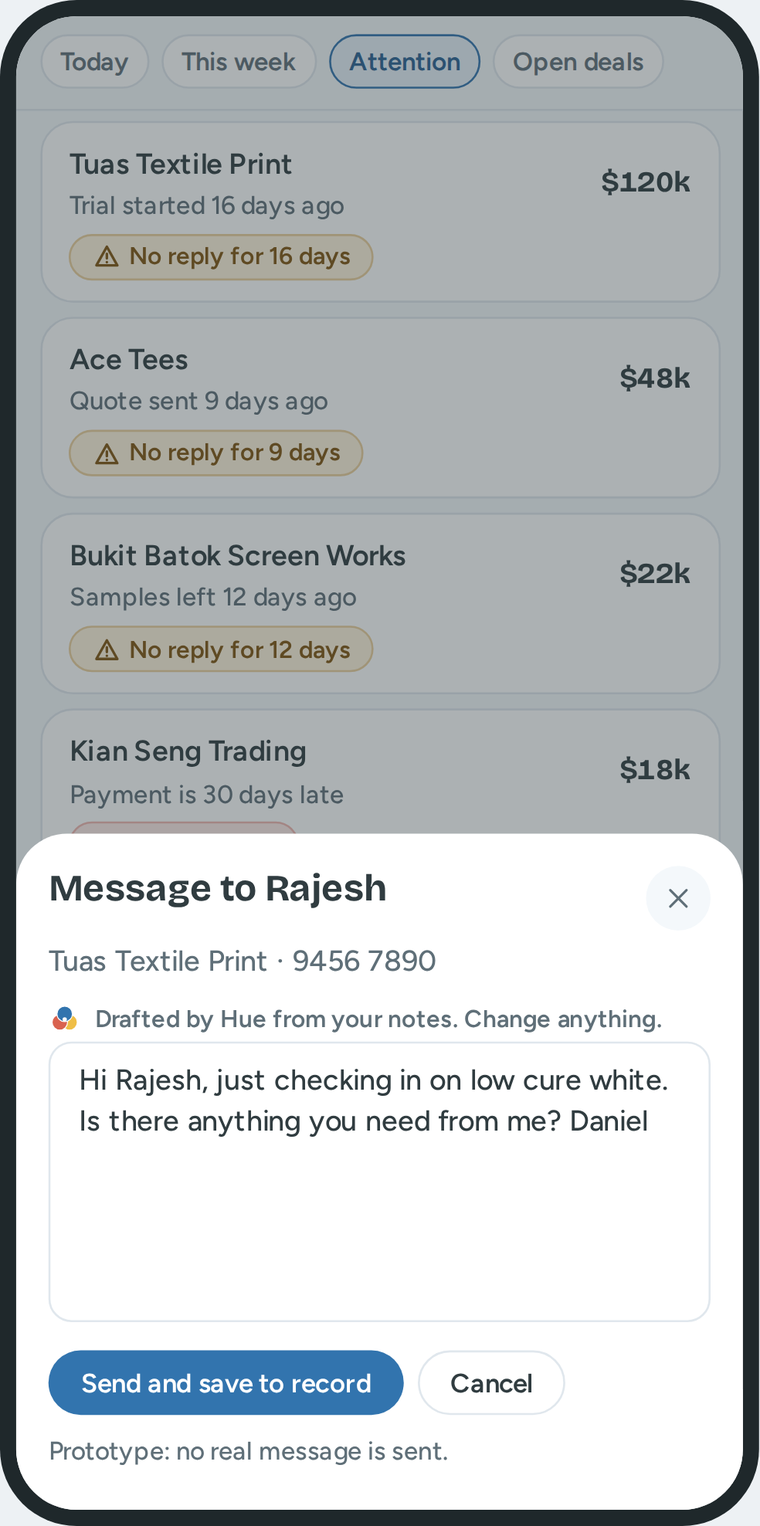
The next step is ready
Hue writes a message. Daniel changes it and sends it.
A late payment is another case
It can link to no reply, or not. Hue alerts him and gives a plan that he can offer with no approval.
Hue · Design challenge · Loo Say Hien
22
22 of 34
Notes. Sometimes a customer does not reply. Hue alerts Daniel with the label No reply, and it gives the reason. Here, the trial started 16 days ago, and a trial usually gives a result in 14 days. The usual wait is different for each stage. Daniel can tell Hue that it is wrong. Then Hue waits longer the next time. And Hue writes a message that he can change and send. Another situation that can happen is a late payment. It can link to no reply, or it can be a separate case. In both cases Hue alerts Daniel and gives a plan that follows the finance rules. He can offer the plan with no approval.
The design
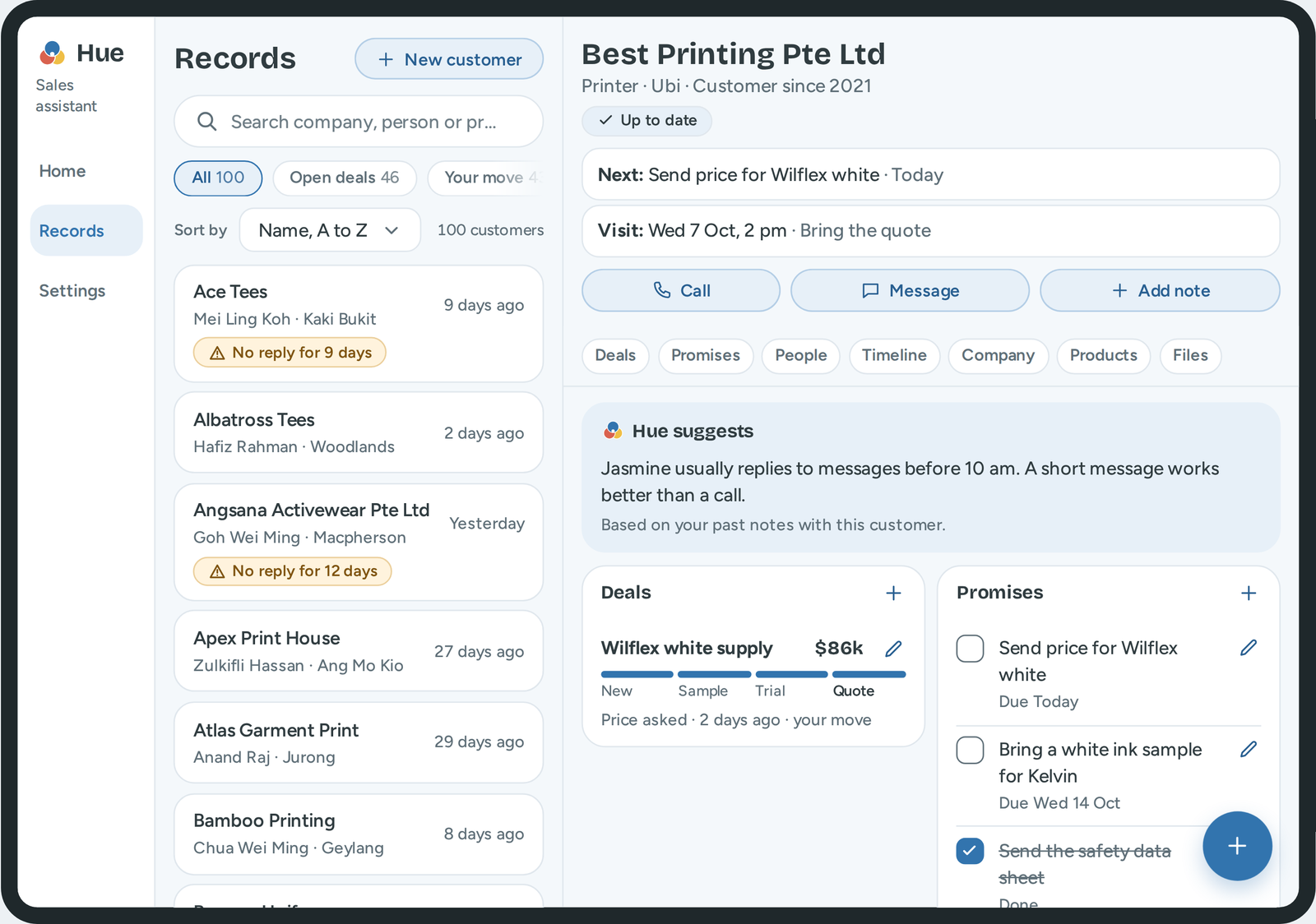
Each customer has one record. All other screens use it.
Daniel can change his own notes
A visit, a call or a note. The pen icon opens it.
He cannot change a message or an email
A lock shows this. To correct it, he adds a note.
A deal stays in the record
When the customer says no, the stage changes to Lost. The history stays.
Hue · Design challenge · Loo Say Hien
23
23 of 34
Notes. Each note goes into one record for each customer. The record has the deals, the promises, the people, the timeline and the products. All the other screens use this record. Daniel can change his own notes. He cannot change a message or an email, and a lock shows this. A deal stays in the record. When the customer says no, the stage changes to Lost.
The design
Hue works the same way on a phone, a tablet and a computer.
Phone
For the road. The round button is near his thumb.
Tablet
More room to write. The list and the record are side by side.
Computer
A full table. New note: type, talk or attach a photo.
Hue · Design challenge · Loo Say Hien
24
24 of 34
Notes. Hue works on three devices, with the same rules. The phone is for the road. The tablet shows the list and the record side by side. The computer has a full table, and the New note button lets him type, talk or attach a photo. He learns Hue one time.
The system
The design system: one set of rules for all screens.
A blue inspired by the Avient blue
The app blue is more subdued. It does not shout, so Daniel can focus on his work. No green.
One main button on each screen
Save to record
Open draft
Cancel
Dark blue is the main action. Light blue is an action in a section. White is for all other actions.
Words and icons show the status
Up to date
No reply for 9 days
Payment late
Colour is never the only sign. Each status has a word and an icon.
Clear words
"Trial started 16 days ago, and no contact since."
Short sentences. No short forms. Each suggestion gives a reason and one next step.
Hue · Design challenge · Loo Say Hien
25
25 of 34
Notes. A design system is the set of rules that keeps all screens the same. The blue is inspired by the Avient blue. It is more subdued, so it does not shout, and Daniel can focus on his work. Each screen has one dark button for the main action. Words and icons show the status. Colour is never the only sign. The words are short and clear.
The system
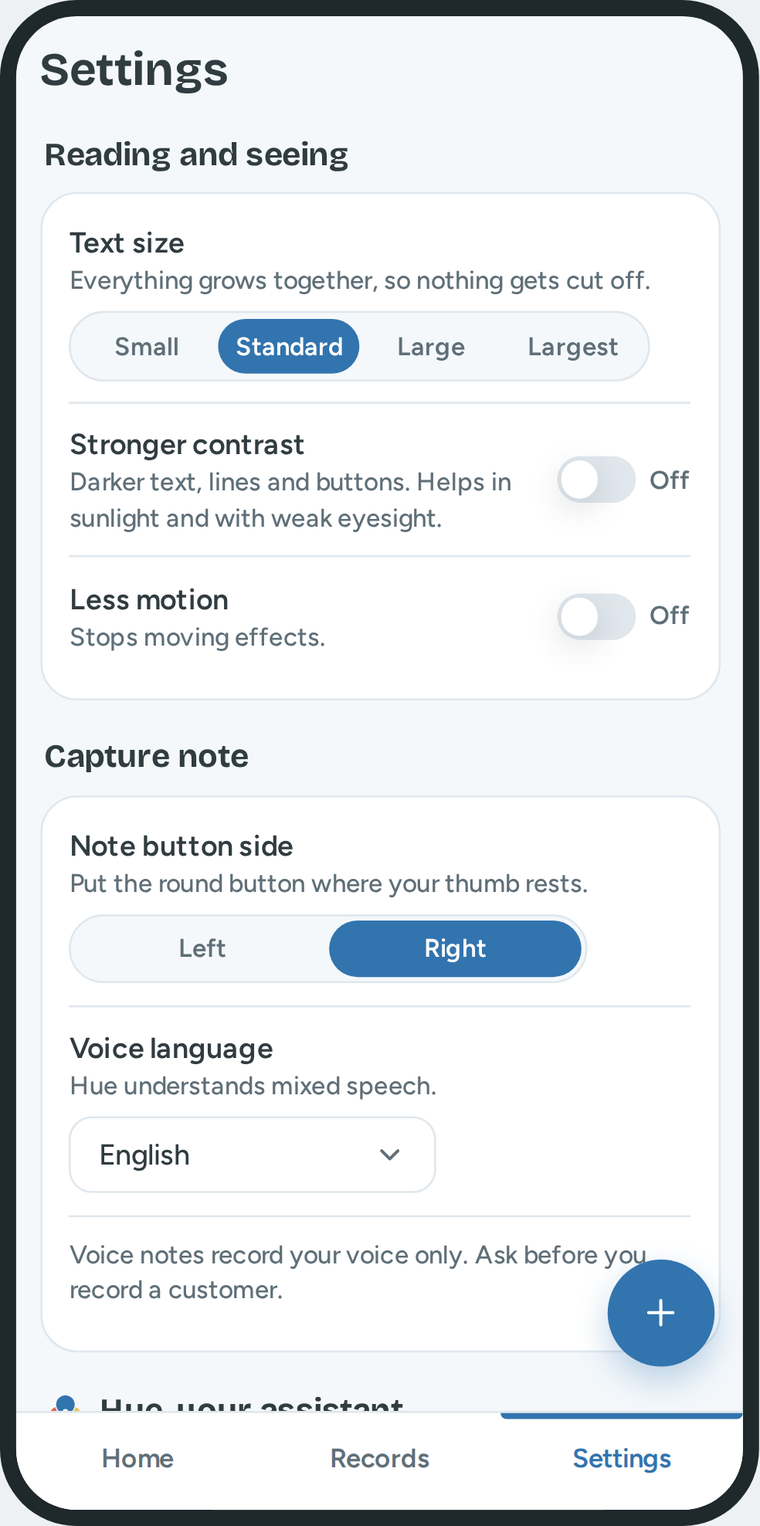
Accessibility: he can use Hue in sunlight and with one hand.
Four text sizes
All text and buttons grow together.
Stronger contrast
Darker text and lines, for sunlight.
Less motion
One switch stops the motion.
Left or right hand
The round button moves to his thumb.
Not only colour
Each status has a word and an icon.
Keyboard and screen reader
Each control has a name. Menus work with keys.
Daniel also has control. Each job of Hue has its own switch. When a job is off, the screen still works.
Hue · Design challenge · Loo Say Hien
26
26 of 34
Notes. Accessibility means that Daniel can read and use Hue in his real conditions. He works in sunlight and often with one hand. So Hue has four text sizes, stronger contrast, less motion, and a round button for the left or the right hand. Each status has a word and an icon. The menus work with the keyboard. He also has control: each job of Hue has its own switch.
The checks
The prototype: what works, and what is only a sample.
These parts work
The rule that gives the order of the follow ups.
The alerts for no reply.
The rules and the error messages of the forms.
Search, filters and sort for 100 sample customers.
The search for an address.
These parts are only a sample
Talk shows a sample sentence. It does not use the microphone.
Hue reads a note with rules that I wrote. It does not use a language model.
Write and Photo read a sample note.
No message, email or call leaves the prototype.
The payment status and the payment plan are sample data.
In a real product, one large language model can do most of the sample jobs. It turns speech into text, reads handwriting, fills in the fields and writes drafts. The developers connect it to the records. Then they test each job with real notes.
Hue · Design challenge · Loo Say Hien
27
27 of 34
Notes. I want to be clear about the prototype. Some parts work. The rule for the order of the follow ups works. The alerts, the forms and the search work. Other parts are only a sample. Talk shows a sample sentence. Write and Photo read a sample note. No message leaves the prototype. The payment status is sample data. In a real product, one large language model can do most of the sample jobs. The developers connect it to the records. Then they test each job with real notes.
The checks
I did not interview sales reps. I must test these nine assumptions.
The assumption
How to test it
Sales reps write short notes in the meeting, or after it
Ask when they write notes most often, and with what
They do most work on a phone, between visits
Ask what they use between meetings
Customers use chat and calls more than email
Ask reps what customers often use to communicate
The size of a deal is not a good way to choose
Ask how they choose which deal is first
A customer who did not order can still order later
Ask how often a quiet quote became an order later
A recording can feel intrusive, also with permission
Ask reps how customers react to a recording
Reps want to talk, type, write or take a photo
Show the four ways. See which way they choose
The accounts system can give the payment status
Ask the finance team what the system can share
The usual wait is 3, 7, 14 and 5 days for the four stages
Compare with real deals
The first test. Show Today to five or more sales reps. Do they agree with the order? Also ask for their usual steps around a visit.
Hue · Design challenge · Loo Say Hien
28
28 of 34
Notes. I did not interview sales reps. So the design uses nine assumptions. This slide shows how to test each assumption. The first test is easy. I show Today to five sales reps or more. I ask one question: do you agree with the order of the follow ups? If they do not agree, the rule for the order is wrong. I also ask for their usual steps before and after a visit.
The checks
Features that I did not include, and why.
Views for other people. I designed for one sales rep first.
The view for his manager
A manager needs other screens: the team and the forecast.
The view for the technical specialist
She needs the details of each trial. That is a second user with a second job.
The view for the distributor
A distributor is outside Avient. Avient must first decide what he can see.
Connections. They need work with Avient systems.
Work with no internet
It needs storage on the device, and a rule for two versions of one record.
Import from a real system, such as accounts
It shows who did not pay. It needs access to Avient systems, so the prototype has sample payments.
Hue · Design challenge · Loo Say Hien
29
29 of 34
Notes. I did not include five features. Three are views for other people: his manager, the technical specialist and the distributor. I designed for one sales rep first. Work with no internet needs storage on the device. Import from a real system, such as the accounts system, needs access to Avient systems. So the late payments in the prototype are sample data.
The checks
How to measure if Hue helps Daniel.
Goal
What we measure
First target
See sales progress
He can say how far he is from his target
In less than 10 seconds
Know what is important
The first three follow ups in Today are done on the same day
2 of 3, on most days
Find deals with no reply
He acts after a "No reply" alert
8 of 10, in 2 work days
Act quickly
The time to record a note by voice
Less than 30 seconds
Notes are easy to do
Visits that have a note in Hue on the same day
9 of 10 visits
Trust in Hue
Notes that he saves with no correction
7 of 10
Not too many alerts
Alerts that he answers with "This is normal for this customer"
Fewer than 3 of 10. More means that Hue alerts too early
These targets are my first values. The first week measures where he is today. Two slower results to watch: the deals with no reply for more than 30 days, and the sales against the target.
Hue · Design challenge · Loo Say Hien
30
30 of 34
Notes. How do we know that Hue helps Daniel? Each goal has one measure, and there are two more measures for trust and for the number of alerts. One example: when Daniel answers an alert with the words this is normal, the alert was not useful. If this happens for more than 3 of 10 alerts, Hue alerts too early. These targets are my first values. The first week measures only where he is today.
The checks
How I worked with Claude.
What I brought
The company, the place and the job
The job description, seven sales videos and a forum
My sketches and example dashboards
My feedback in fourteen review rounds
What Claude did
Made a summary of my sources
Made drafts of the user, the week and the ideas
Asked questions and gave its opinion
Wrote and tested the prototype code
Built the deck and the film from my direction
What I decided
The scope: one sales rep, one work day
How to choose from 23 ideas: three scores, with privacy risk first
Four ways to record a note on the go: talk, type, write, photo
One language model for many jobs
The note guide: Hue ticks what a good note says
Hue as a brand: a name, a logo and motion
The weather that names the visit it changes
The look: light, a subdued blue, no green
One round button to record
One Home on each device
Settings and accessibility
The words: "Follow ups", "No reply", "Check and save"
The limits. The sources are not from interviews. The people and the numbers in the prototype are not real. The film clips, the picture of Daniel and the voice are generated.
Hue · Design challenge · Loo Say Hien
31
31 of 34
Notes. This is how I worked with Claude. I brought the sources, my sketches and my feedback in fourteen review rounds. Claude made drafts, gave its opinion, and wrote the code. I made the decisions on the right. Some examples: four ways to record a note on the go. One language model for many jobs. The note guide, where Hue ticks what a good note says. And Hue as a brand. The limits: the sources are not from interviews, and the people and the numbers in the prototype are not real.
Notes. The project has four more parts. Each is a page on GitHub. The film shows one work day in 90 seconds. The guide, How Hue Works, explains each screen. The design system has the colours, the parts and the rules for words. And the code is one file.
It is the real prototype, with sample data. You can tap each part.
Seven things to try
Hold the round button
Hue starts to listen immediately.
Tap the round button, then Write
A sample note writes itself.
Record a note, then tap "Check later"
The note waits at the top of Home.
Tap "See the plan" on a late payment
Send the message. Then find it in the timeline of that customer.
Tap a stage in Open deals, on Home
The list shows only the deals in that stage.
Open Records, then a customer
Add or change a card in a section.
Open Settings
Change the text size, the contrast and the jobs of Hue.
No internet in the room? The prototype also works from a folder on the computer.
Hue · Design challenge · Loo Say Hien
34
34 of 34
Notes. The prototype is on the internet. Point your camera at the code. It opens the page with all links, and the prototype is the first link. It has sample data. You can tap each part. Here are seven things to try. Hold the round button, and Hue starts to listen. Select Write, and a sample note writes itself. Record a note and tap Check later. Tap See the plan on a late payment, send the message, and find it in the timeline of that customer. Tap a stage in Open deals. Open a customer record and change a card. Open Settings.
Press the arrow keys to turn the page
Right arrow: the next slide. Left arrow: the slide before. Esc closes the presentation.
Swipe to turn the page
Swipe left: the next slide. Swipe right: the slide before. The arrows at the bottom do the same.